
DM1 for iPhone4.0.8 - App Store
Sie können Ergebnisse sehen in einige Sekunden.
Herausgeberbeschreibung
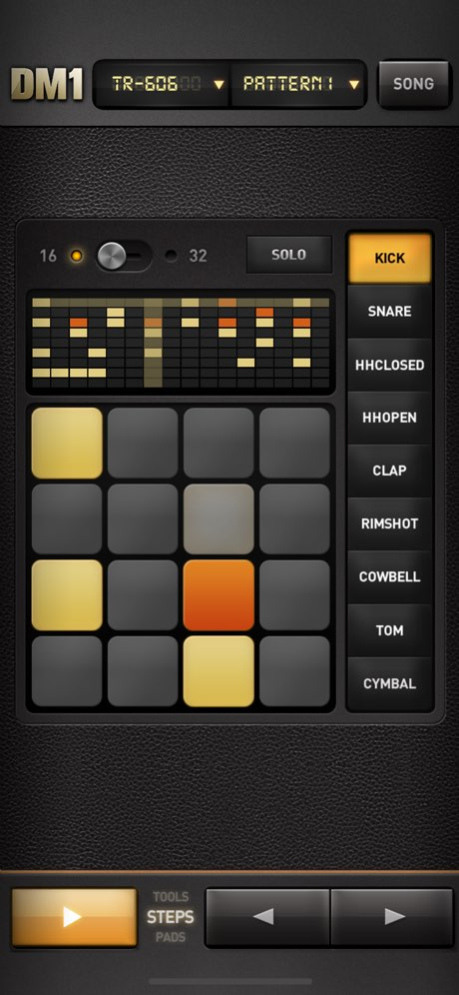
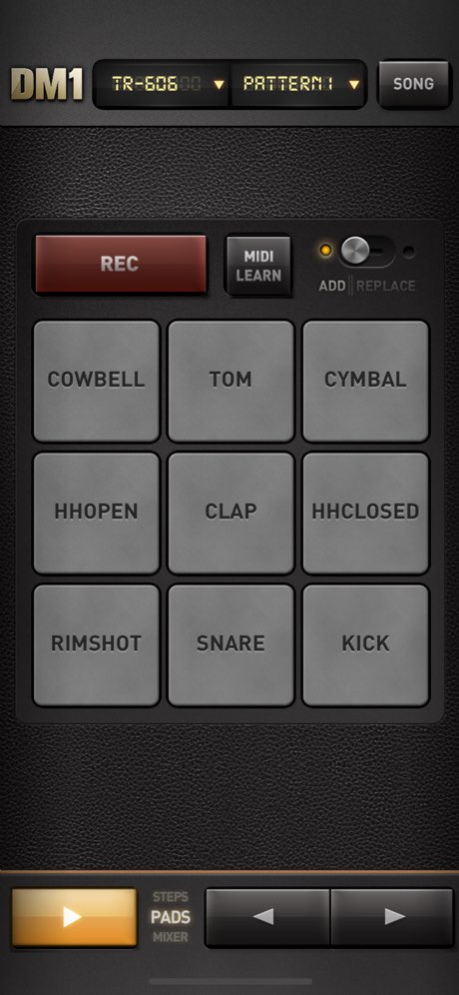
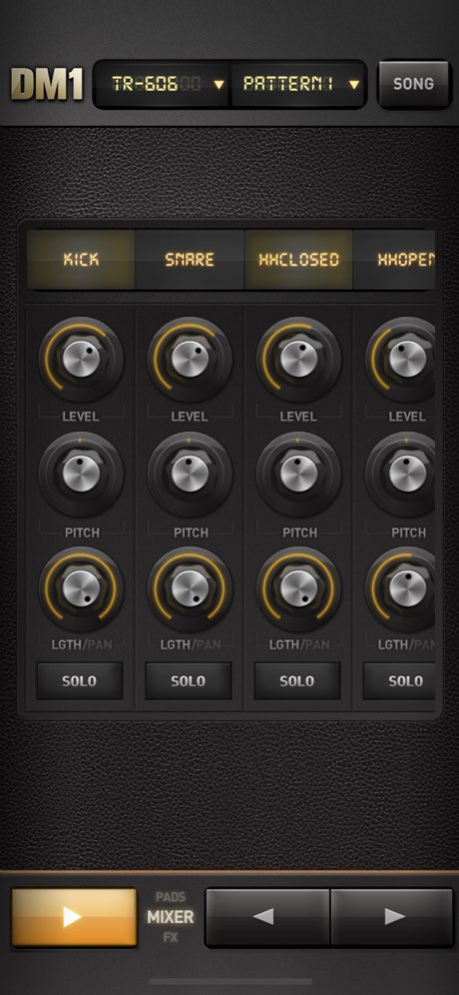
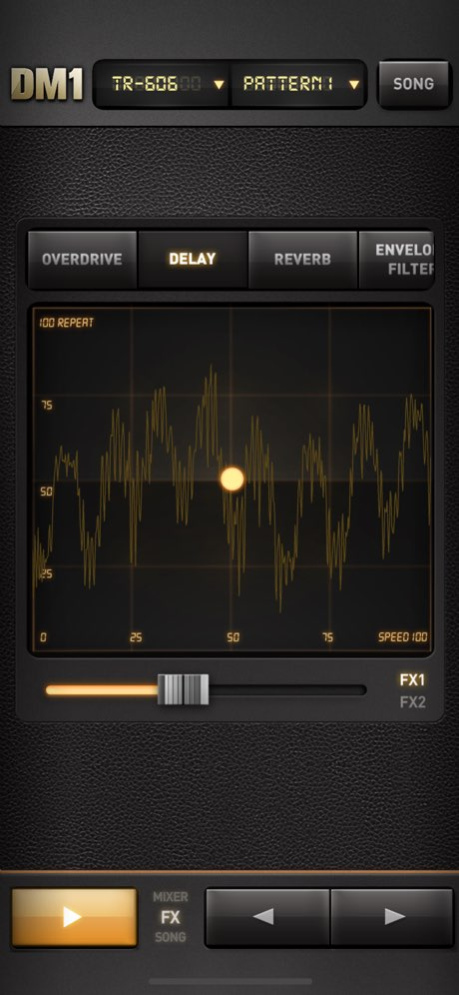
DM1 ist ein erweiterter Vintage-Drumcomputer. Die App verwandelt Ihren iPhone in einen unterhaltsamen und kreativen Beat-Mach-Computer.
DM1 lässt sich einfach und schnell benutzen, und die 154 erstklassigen elektronischen Drum Kits und die wunderschöne, hyperrealistische Grafik zeigen, dass DM1 so gestaltet wurde, dass Sie sofort richtig viel Spaß haben können.
Wir bei Fingerlab sind selbst elektronische Musiker, deshalb haben wir DM1 so entwickelt, dass wir Ihnen die perfekte Mischung aus spaßiger Spielbarkeit und leistungsstarken Klangfunktionen bieten können. Wir behalten immer im Hinterkopf, wie wichtig ein hübsches Design mit der richtigen Balance aus leistungsstarken Funktionen ist, und vermeiden dabei holprige, überladende Oberflächen.
Hören Sie sich unsere 154 elektronischen Drum Kits an – darunter 42 klassische Vintage Drum Kits und 112 von uns produzierte elektronische Kits, die im Fingerlab-Profi-Studio bearbeitet und gemastert wurden.
DM1 bietet die 5 Hauptbereiche:
1 – DER SCHRITT SEQUENCER lässt Ihrer Fantasie freien Lauf und nutzt den Multi-Touch-Bildschirm auf schlaue Art. Schalten Sie Schritte in Ihrer Sequenz mit einem einzigen Tippen einfach ein und aus, um coole Beats oder unerwartete Rhythmen zu erstellen!
2 – Mit den DRUM PADS können Sie den Beat spielen und aufnehmen, der Ihnen in den Fingern juckt. Sie müssen kein Spitzen-Drummer sein, die automatische Quantisierung übernimmt das für Sie.
3 - DER MIXER für schnelles und subtiles Tonmischen Ihrer Drum Kits. Mit Einstellungen für Lautstärke, Tonhöhe Sampel.Länge, benutzerdefinierten Drum Kit-Elementen für jeden Kanal, Stumm- und Solo-Modus.
4 – Die EFFFEKT-TRACKPADS, ein kreative aus Effekt-Trackpad, mit denen Sie Ihre Beats verzerren, abstimmen und umwandeln können. Zu den Effekten gehören: Overdrive, Delay, Reverb, Phaser, Dalek, Formant, Filter, Compressor, Envelope follower, Dub Delay, Roboter, Texturizer und NoiseGate.
5 – Mit dem SONG-KOMPONENT können Sie schnell einen Song aus den selbst erstellten Beat-Mustern machen. Ziehen Sie einfach die Muster in die Zeitleiste und legen sie dort ab. Schnell und simpel.
Angaben zur App:
- Grafikdesign von Jonas Eriksson
- Smarte Ergonomie für schnelle Kreativität und Spaß
- 108 Vintage und speziell erstellte Drum Kits, die im hauseigenen Tonstudio von Fingerlab gemastert wurden
- 48 zusätzliche Drum-Kits mit In-App-Käufe verfügbar
- Instrument-Modus zum Hinzufügen von Bass, Akkord und Melodie
- 3 Instrumente: Klavier, Korg MicroPreset und Cello Saiten
- 3 weitere Instrumente (Clavinet, Marimba, MiniLogue) sind mit In-App-Käufe verfügbar
- Schritt Sequencer mit Multi-Touch-Matrix
- Mixer-Seite mit Tonhöhe, Länge und Level-Drehsteuerung, Schwenksteuerung und einem benutzerdefinierten Drum Kit pro Kanal
- 9 Big Drum Pads, quantisierte Aufnahme und Tonhöhenbeugungsrad
- Effekt-Trackpad für Echtzeit-Klangverzerrung und mehrere Effekte
- 16 oder Schritte pro Sample
- Das Randomizer-Tool
- Extra schnelles Laden der Drum Kits
- Abspielbare Hörprobenauswahl für noch mehr Kreativität
- Modus-Song mit intuitiver Bearbeitung
- Hochwertiger Export an E-Mail, FaceBook, SoundCloud, iTunes-Privatfreigabe oder AudioCopy
- Tonhintergrundmodus
- AudioBus support
- Import & Export your song project (DropBox, Mail, iTunes folder)
- Full Midi Implementation
- Inter-App Audio support
Schauen Sie den DM1-Videotrailer auf dem YouTube-Kanal von Fingerlab:
http://www.youtube.com/fingerlab
Sie können uns gern sagen, was Sie von DM1 halten, und was Sie sich im nächsten Update wünschen.
Viel Vergnügen!
Sehen Sie uns: vimeo.com/ fingerlab
Besuchen Sie uns: fingerlab.net
Folgen Sie uns: twitter.com/ fingerlab
Kontaktieren Sie uns: contact@fingerlab.net
Bereitgestellt von Fingerlab
http://www.fingerlab.net
Über DM1 for iPhone
Das Unternehmen, das DM1 for iPhone entwickelt, ist Fingerlab. Die neueste vom Entwickler veröffentlichte Version ist 4.0.8.
Um DM1 for iPhone auf Ihrem iOS-Gerät zu installieren, klicken Sie einfach auf die grüne Schaltfläche Weiter zur App oben, um den Installationsvorgang zu starten. Die App ist seit 2026-06-24 auf unserer Website gelistet und wurde 0 Mal heruntergeladen. Wir haben bereits geprüft, ob der Download-Link sicher ist; zu Ihrem eigenen Schutz empfehlen wir jedoch, die heruntergeladene App mit Ihrem Antivirusprogramm zu scannen. Ihr Antivirusprogramm kann DM1 for iPhone als Malware erkennen, wenn der Download-Link defekt ist.
So installieren Sie DM1 for iPhone auf Ihrem iOS-Gerät:
- Klicken Sie auf unserer Website auf die Schaltfläche Weiter zur App. Dadurch werden Sie zum App Store weitergeleitet.
- Sobald DM1 for iPhone im iTunes-Eintrag Ihres iOS-Geräts angezeigt wird, können Sie den Download und die Installation starten. Tippen Sie rechts neben der App auf die Schaltfläche LADEN, um den Download zu starten.
- Wenn Sie nicht in der iOS App Store App angemeldet sind, werden Sie nach Ihrer Apple-ID und/oder Ihrem Passwort gefragt.
- Nachdem DM1 for iPhone heruntergeladen wurde, sehen Sie rechts einen INSTALLIEREN-Button. Tippen Sie darauf, um die eigentliche Installation der iOS-App zu starten.
- Sobald die Installation abgeschlossen ist, können Sie auf die Schaltfläche ÖFFNEN tippen, um sie zu starten. Das Symbol wird außerdem zum Startbildschirm Ihres Geräts hinzugefügt.
Programmdetails
Systemanforderungen
Download-Informationen
Preisgestaltung
Versionsgeschichte
Version 4.0.8
veröffentlicht am 2026-06-24
This minor update fixes an issue with Ableton Link and adds support for recent devices.
Stay tuned!
The Fingerlab Team
Version 4.0.8
veröffentlicht am 2026-10-13
Version History This minor update fixes an issue with Ableton Link and adds support for recent devices.
Stay tuned!
The Fingerlab Team 4.0.8 Jun 24 This update adds better support for all recent devices.
Stay tuned!
Fingerlab Team 4.0.7 11/06/2022 This update add better support for all recent devices.
Stay tuned!
Fingerlab Team 4.0.6 10/27/2022 This update fix issues with AudioBus.
Stay tuned!
Fingerlab Team 4.0.5 09/17/2021 This update fix issues with AudioBus and with custom DrumKits.
Stay tuned!
Fingerlab Team 4.0.4 01/10/2021 This update fix various issues with AudioBus, Ableton Link, DropBox and In-App purchase.
Stay tuned!
Fingerlab Team 4.0.3 01/07/2021 Minor update to add "Open in..." destination in audio export popup.
Stay tuned
Fingerlab team 4.0.2 05/29/2020 - Tempo bug fix on recent devices 4.0.1 01/02/2018 -4 drum kits Packs are now available with In-App Purchases, for a totally of 48 new drum kits.
-New Instrument mode, you can now add bass, chords and melody to your rhythm, with 3 instruments: Piano, Korg MicroPreset and Cello.
-3 other instruments (Clavinet, Marimba, MiniLogue) are available with In-App Purchases.
-3 new FX: Reverb, Texturizer, Robotizer, and Noise Gate.
-Song Import is now available!!! Using DropBox and iTunes Sharing Folder.
-Tap tempo added
-iPhone X support 4.0 11/23/2017 - Metronome is now playing only on PADS page when recording steps
- DropBox export bugs fix
- iOS8 bug fixes 3.7.4 07/01/2017 - Fix tempo bug with iPhone 6S & iPhone 6S+
- DropBox SDK update 3.7.3 06/20/2017 - UPDATED: Filter,Dalek & Noise gate effects bug fix
- New Inter-App Audio controller with improved compatibility with Garageband, AUM & Cubasis
- Mixer Knob Length/Pan switch fix for iPhone6+, iPhone6S+ and iPhone7+
- Midi Out wrong midi channel bug fix 3.7.2 04/06/2017 - UPDATED: Audio output bug fix
- New Inter-App Audio controller with improved compatibility with Garageband, AUM & Cubasis
- Mixer Knob Length/Pan switch fix for iPhone6+, iPhone6S+ and iPhone7+
- Midi Out wrong midi channel bug fix 3.7.1 03/30/2017 - New Inter-App Audio controller with improved compatibility with Garageband, AUM & Cubasis
- Mixer Knob Length/Pan switch fix for iPhone6+, iPhone6S+ and iPhone7+
- Midi Out wrong midi channel bug fix 3.7 03/23/2017 -Ableton Link update
-Minor bugs fixes 3.6.2 01/03/2017 - Ableton Link added
- 9 new drum kits
- AudioBus v2.3.1 update 3.6 07/14/2016 -Minor bug fix 3.4.1 03/16/2016 -Metronome bug fix 3.4 03/14/2016 -Facebook export bug fix
-DropBox export bug fix
-You can now logout from your SoundCloud, DropBox or Facebook account with a long tap in the Export page
-AudioCopy SDK update (version 3.2)
-AudioBus SDK update (version 2.3) 3.3.2 02/29/2016 -Metronome bug fix
-DropBox export bug fix
-You can now logout from your SoundCloud, DropBox or Facebook account with a long tap in the Export page
-AudioCopy SDK update (version 3.2)
-AudioBus SDK update (version 2.3) 3.3.1 02/09/2016 - Garage Band Inter-App fix (start DM1 first with Garage Band if needed )
- Audiobus 2.2.2 update 3.3 11/05/2015 - New Midi Engine (with Midibus Library)
- MIDI : added Audio Latency setting
- MIDI : Added Midi Continue handling
- Advanced MIDI Mapping :
- Play / Stop
- Previous+Next Pattern
- Metronome
- New AB Remote controls : added Next/Previous Pattern, Next/Previous Song, Song Mode
- Bigger AB Remote icons 3.2 10/15/2015 - Add Audiobus Remote
- Fixed some Midi Notes & Tempo issues
- Fixed some Inter-app audio (IAA) connection issues 3.1.1 07/20/2015 - New MIDI Engine : automatic MIDI inputs & outputs detection
- New MIDI Engine : improved MIDI synchronisation
- Added Song Loop switch
- Fixed Songs order issue in the Load popup 3.1 07/09/2015 -Launch fix for older devices 3.0.5 05/08/2015
Version 4.0.8
veröffentlicht am 2026-06-30
Version History This minor update fixes an issue with Ableton Link and adds support for recent devices.
Stay tuned!
The Fingerlab Team 4.0.8 5d ago This update adds better support for all recent devices.
Stay tuned!
Fingerlab Team 4.0.7 11/06/2022 This update add better support for all recent devices.
Stay tuned!
Fingerlab Team 4.0.6 10/27/2022 This update fix issues with AudioBus.
Stay tuned!
Fingerlab Team 4.0.5 09/17/2021 This update fix issues with AudioBus and with custom DrumKits.
Stay tuned!
Fingerlab Team 4.0.4 01/10/2021 This update fix various issues with AudioBus, Ableton Link, DropBox and In-App purchase.
Stay tuned!
Fingerlab Team 4.0.3 01/07/2021 Minor update to add "Open in..." destination in audio export popup.
Stay tuned
Fingerlab team 4.0.2 05/29/2020 - Tempo bug fix on recent devices 4.0.1 01/02/2018 -4 drum kits Packs are now available with In-App Purchases, for a totally of 48 new drum kits.
-New Instrument mode, you can now add bass, chords and melody to your rhythm, with 3 instruments: Piano, Korg MicroPreset and Cello.
-3 other instruments (Clavinet, Marimba, MiniLogue) are available with In-App Purchases.
-3 new FX: Reverb, Texturizer, Robotizer, and Noise Gate.
-Song Import is now available!!! Using DropBox and iTunes Sharing Folder.
-Tap tempo added
-iPhone X support 4.0 11/23/2017 - Metronome is now playing only on PADS page when recording steps
- DropBox export bugs fix
- iOS8 bug fixes 3.7.4 07/01/2017 - Fix tempo bug with iPhone 6S & iPhone 6S+
- DropBox SDK update 3.7.3 06/20/2017 - UPDATED: Filter,Dalek & Noise gate effects bug fix
- New Inter-App Audio controller with improved compatibility with Garageband, AUM & Cubasis
- Mixer Knob Length/Pan switch fix for iPhone6+, iPhone6S+ and iPhone7+
- Midi Out wrong midi channel bug fix 3.7.2 04/06/2017 - UPDATED: Audio output bug fix
- New Inter-App Audio controller with improved compatibility with Garageband, AUM & Cubasis
- Mixer Knob Length/Pan switch fix for iPhone6+, iPhone6S+ and iPhone7+
- Midi Out wrong midi channel bug fix 3.7.1 03/30/2017 - New Inter-App Audio controller with improved compatibility with Garageband, AUM & Cubasis
- Mixer Knob Length/Pan switch fix for iPhone6+, iPhone6S+ and iPhone7+
- Midi Out wrong midi channel bug fix 3.7 03/23/2017 -Ableton Link update
-Minor bugs fixes 3.6.2 01/03/2017 - Ableton Link added
- 9 new drum kits
- AudioBus v2.3.1 update 3.6 07/14/2016 -Minor bug fix 3.4.1 03/16/2016 -Metronome bug fix 3.4 03/14/2016 -Facebook export bug fix
-DropBox export bug fix
-You can now logout from your SoundCloud, DropBox or Facebook account with a long tap in the Export page
-AudioCopy SDK update (version 3.2)
-AudioBus SDK update (version 2.3) 3.3.2 02/29/2016 -Metronome bug fix
-DropBox export bug fix
-You can now logout from your SoundCloud, DropBox or Facebook account with a long tap in the Export page
-AudioCopy SDK update (version 3.2)
-AudioBus SDK update (version 2.3) 3.3.1 02/09/2016 - Garage Band Inter-App fix (start DM1 first with Garage Band if needed )
- Audiobus 2.2.2 update 3.3 11/05/2015 - New Midi Engine (with Midibus Library)
- MIDI : added Audio Latency setting
- MIDI : Added Midi Continue handling
- Advanced MIDI Mapping :
- Play / Stop
- Previous+Next Pattern
- Metronome
- New AB Remote controls : added Next/Previous Pattern, Next/Previous Song, Song Mode
- Bigger AB Remote icons 3.2 10/15/2015 - Add Audiobus Remote
- Fixed some Midi Notes & Tempo issues
- Fixed some Inter-app audio (IAA) connection issues 3.1.1 07/20/2015 - New MIDI Engine : automatic MIDI inputs & outputs detection
- New MIDI Engine : improved MIDI synchronisation
- Added Song Loop switch
- Fixed Songs order issue in the Load popup 3.1 07/09/2015 -Launch fix for older devices 3.0.5 05/08/2015
Version 4.0.7
veröffentlicht am 2026-06-03
Version History This update adds better support for all recent devices.
Stay tuned!
Fingerlab Team 4.0.7 11/06/2022 This update add better support for all recent devices.
Stay tuned!
Fingerlab Team 4.0.6 10/27/2022 This update fix issues with AudioBus.
Stay tuned!
Fingerlab Team 4.0.5 09/17/2021 This update fix issues with AudioBus and with custom DrumKits.
Stay tuned!
Fingerlab Team 4.0.4 01/10/2021 This update fix various issues with AudioBus, Ableton Link, DropBox and In-App purchase.
Stay tuned!
Fingerlab Team 4.0.3 01/07/2021 Minor update to add "Open in..." destination in audio export popup.
Stay tuned
Fingerlab team 4.0.2 05/29/2020 - Tempo bug fix on recent devices 4.0.1 01/02/2018 -4 drum kits Packs are now available with In-App Purchases, for a totally of 48 new drum kits.
-New Instrument mode, you can now add bass, chords and melody to your rhythm, with 3 instruments: Piano, Korg MicroPreset and Cello.
-3 other instruments (Clavinet, Marimba, MiniLogue) are available with In-App Purchases.
-3 new FX: Reverb, Texturizer, Robotizer, and Noise Gate.
-Song Import is now available!!! Using DropBox and iTunes Sharing Folder.
-Tap tempo added
-iPhone X support 4.0 11/23/2017 - Metronome is now playing only on PADS page when recording steps
- DropBox export bugs fix
- iOS8 bug fixes 3.7.4 07/01/2017 - Fix tempo bug with iPhone 6S & iPhone 6S+
- DropBox SDK update 3.7.3 06/20/2017 - UPDATED: Filter,Dalek & Noise gate effects bug fix
- New Inter-App Audio controller with improved compatibility with Garageband, AUM & Cubasis
- Mixer Knob Length/Pan switch fix for iPhone6+, iPhone6S+ and iPhone7+
- Midi Out wrong midi channel bug fix 3.7.2 04/06/2017 - UPDATED: Audio output bug fix
- New Inter-App Audio controller with improved compatibility with Garageband, AUM & Cubasis
- Mixer Knob Length/Pan switch fix for iPhone6+, iPhone6S+ and iPhone7+
- Midi Out wrong midi channel bug fix 3.7.1 03/30/2017 - New Inter-App Audio controller with improved compatibility with Garageband, AUM & Cubasis
- Mixer Knob Length/Pan switch fix for iPhone6+, iPhone6S+ and iPhone7+
- Midi Out wrong midi channel bug fix 3.7 03/23/2017 -Ableton Link update
-Minor bugs fixes 3.6.2 01/03/2017 - Ableton Link added
- 9 new drum kits
- AudioBus v2.3.1 update 3.6 07/14/2016 -Minor bug fix 3.4.1 03/16/2016 -Metronome bug fix 3.4 03/14/2016 -Facebook export bug fix
-DropBox export bug fix
-You can now logout from your SoundCloud, DropBox or Facebook account with a long tap in the Export page
-AudioCopy SDK update (version 3.2)
-AudioBus SDK update (version 2.3) 3.3.2 02/29/2016 -Metronome bug fix
-DropBox export bug fix
-You can now logout from your SoundCloud, DropBox or Facebook account with a long tap in the Export page
-AudioCopy SDK update (version 3.2)
-AudioBus SDK update (version 2.3) 3.3.1 02/09/2016 - Garage Band Inter-App fix (start DM1 first with Garage Band if needed )
- Audiobus 2.2.2 update 3.3 11/05/2015 - New Midi Engine (with Midibus Library)
- MIDI : added Audio Latency setting
- MIDI : Added Midi Continue handling
- Advanced MIDI Mapping :
- Play / Stop
- Previous+Next Pattern
- Metronome
- New AB Remote controls : added Next/Previous Pattern, Next/Previous Song, Song Mode
- Bigger AB Remote icons 3.2 10/15/2015 - Add Audiobus Remote
- Fixed some Midi Notes & Tempo issues
- Fixed some Inter-app audio (IAA) connection issues 3.1.1 07/20/2015 - New MIDI Engine : automatic MIDI inputs & outputs detection
- New MIDI Engine : improved MIDI synchronisation
- Added Song Loop switch
- Fixed Songs order issue in the Load popup 3.1 07/09/2015 -Launch fix for older devices 3.0.5 05/08/2015 -Pattern popup fix
-Launch improved for older devices 3.0.4 04/21/2015
Version 4.0.7
veröffentlicht am 2022-11-06
Nov 6, 2022
Version 4.0.7
This update adds better support for all recent devices.
Stay tuned!
Fingerlab Team
Version 4.0.7
veröffentlicht am 2022-11-06
This update adds better support for all recent devices.
Stay tuned!
Fingerlab Team
Version 4.0.5
veröffentlicht am 2021-09-17
Sep 17, 2021 Version 4.0.5
This update fix issues with AudioBus.
Stay tuned!
Fingerlab Team
Version 4.0.4
veröffentlicht am 2021-01-10
Jan 10, 2021 Version 4.0.4
This update fix issues with AudioBus and with custom DrumKits.
Stay tuned!
Fingerlab Team
Version 4.0.4
veröffentlicht am 2021-01-10
10 Jan 2021 Version 4.0.4
This update fix issues with AudioBus and with custom DrumKits.
Stay tuned!
Fingerlab Team
Version 4.0.3
veröffentlicht am 2021-01-07
Jan 7, 2021 Version 4.0.3
This update fix various issues with AudioBus, Ableton Link, DropBox and In-App purchase.
Stay tuned!
Fingerlab Team
Haftungsausschluss
Offizieller App Store-Link
Wir hosten DM1 for iPhone nicht auf unseren Servern. Wir haben es nicht auf Viren, Adware, Spyware oder andere Arten von Malware gescannt. Diese App wird von Apple gehostet und hat deren Allgemeine Geschäftsbedingungen erfüllt, um dort gelistet zu werden. Wir empfehlen Vorsicht bei der Installation.
Der App-Store-Link für DM1 for iPhone wird Ihnen von apps112.com ohne jegliche Zusicherungen, Gewährleistungen oder Garantien zur Verfügung gestellt, greifen Sie daher auf eigene Gefahr darauf zu.
Bei Fragen zu dieser speziellen App wenden Sie sich bitte direkt an den Herausgeber. Bei Fragen zu den Funktionalitäten von apps112.com kontaktieren Sie uns.
